
Oracle Database is a Relational DataBase Management system (RDBMS) that is widely used for enterprise-level applications. Its architecture is designed to provide a robust and scalable platform for storing, managing, and retrieving data. The architecture of Oracle Database involves several key components and processes.
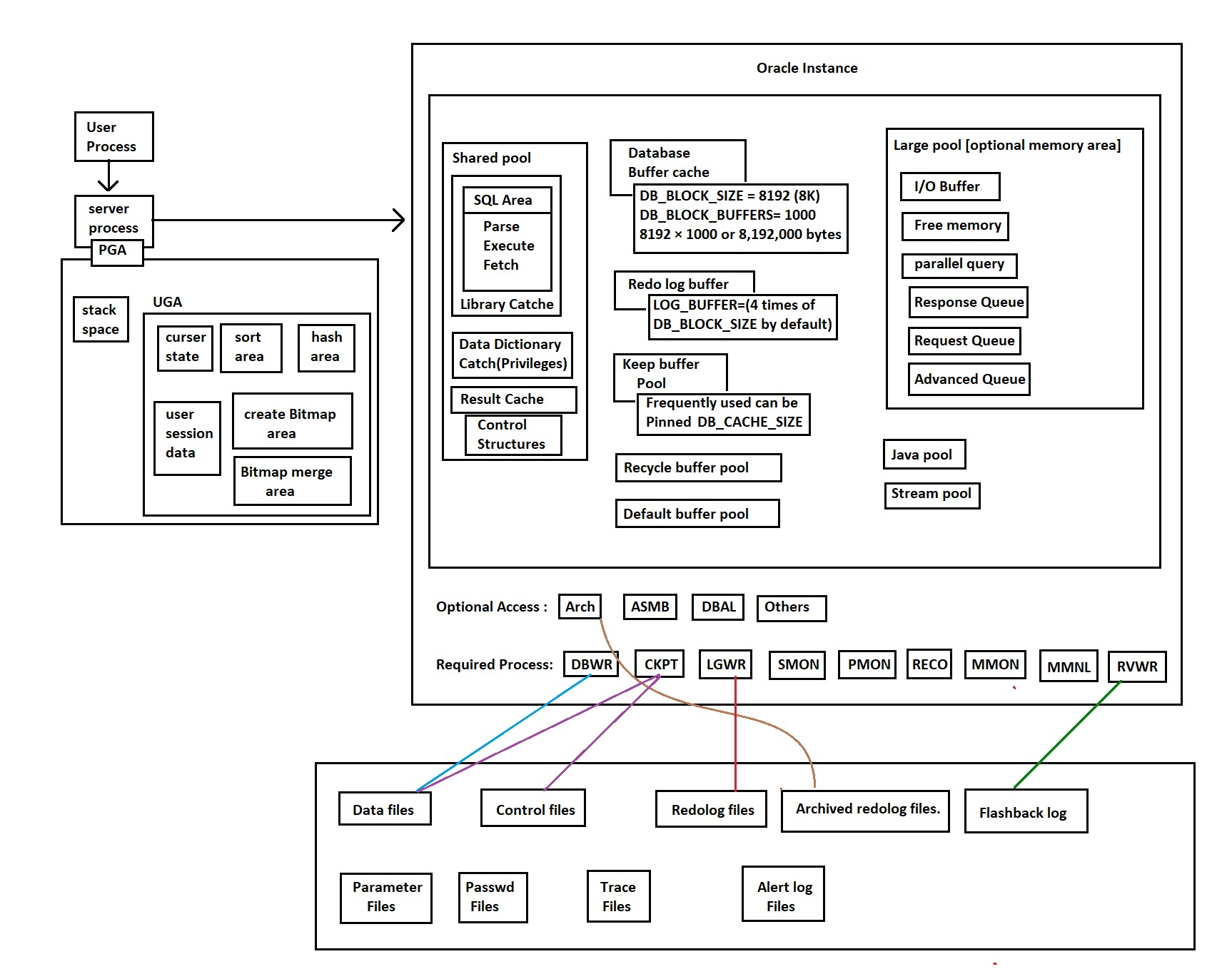
- Instances
- Database files
- Background processes
- User Processes
- Server processes
1. Instances
- An Oracle Database instance is created and started when you launch/start the database. It consists of memory structures and background processes. These components work together to manage database operations.
- The memory structures, such as the SGA (System Global Area) and PGA (Program Global Area), play a crucial role in caching data, storing executable code, and managing user sessions.
- An instance is a collection of memory structures and background processes that operate on a set of database files. Each running Oracle Database is associated with one and only one database instance.
- Memory structures include the System Global Area (SGA) and the Program Global Area (PGA).
- The SGA contains shared memory components such as the buffer cache, the shared pool, and the redo log buffer.
- The PGA contains memory specific to an individual process.
2. Database files
- Oracle Database uses physical files to store data. These files include data files, control files, and redo log files.
- Data files store the actual data of the database.
- Control files contain metadata about the database, such as the database name, data file locations, and log file information.
- Redo log files record changes made to the database for recovery purposes.
3. Background Processes
Oracle Database uses several background processes to perform various tasks.- DBWn (Database Writer): Writes modified buffers in the SGA to data files.
- LGWR (Log Writer): Writes redo log entries to disk.
- CKPT (Checkpoint): Records checkpoint information in the control file.
- SMON (System Monitor): Performs instance recovery after a crash.
- PMON (Process Monitor): Performs process recovery and cleanup.
4. User Processes
- User processes are created for each user connecting to the Oracle Database.
- These processes communicate with the instance and perform tasks on behalf of users, such as executing queries, updates, or inserts.
5. Oracle Shared Server Architecture (Optional)
- In addition to the dedicated server architecture, Oracle Database supports a shared server architecture where multiple user processes share a pool of server processes.
- This is useful for environments with a large number of concurrent users.
6. Network Architecture
- Oracle Database supports a variety of network architectures, including local connections (e.g., through Oracle Net) and distributed database connections (e.g., Oracle Transparent Network Substrate).
7. Oracle Grid Architecture (Optional)
- Oracle Grid Infrastructure, when installed, provides a clustered environment for Oracle Databases.
- It includes Oracle Clusterware for cluster management and Oracle Automatic Storage Management (ASM) for simplified storage management.
Frequently asked questions
What is the difference between an instance and a database?
The instance is the memory (SGA and PGA) plus the background processes running on the server. The database is the physical files on disk: datafiles, control files and redo logs. The instance is started first and then opens the database.
What is the difference between the SGA and the PGA?
The SGA is shared by all sessions and holds the buffer cache, shared pool and redo log buffer. The PGA is private to one server process and holds session work areas such as sorts.
Which process writes data to disk when I commit?
At commit, LGWR writes the redo entries to the online redo log, and that is what makes the change durable. DBWn writes the changed data blocks to the datafiles later, in the background.
What happens after the server crashes?
At the next startup, SMON performs instance recovery: it reapplies committed changes from the online redo logs and rolls back uncommitted ones.
Dedicated server or shared server: which should I use?
Dedicated server, the default, gives each session its own server process and suits most systems. Shared server lets many sessions share a pool of processes, which helps only with very large numbers of mostly idle connections.
Comments
0Please sign in to leave a comment.
No comments yet
Be the first to share your thoughts!