The symptom
The broker configuration looks perfect from the primary:
DGMGRL> SHOW CONFIGURATION LAG;

  oradb      - Primary database
    oradb_stby - Physical standby database
                 Transport Lag:      0 seconds
                 Apply Lag:          0 seconds

Configuration Status:
SUCCESS
Then, on the standby host:
[oracle@dg2 ~]$ srvctl status database -d oradb
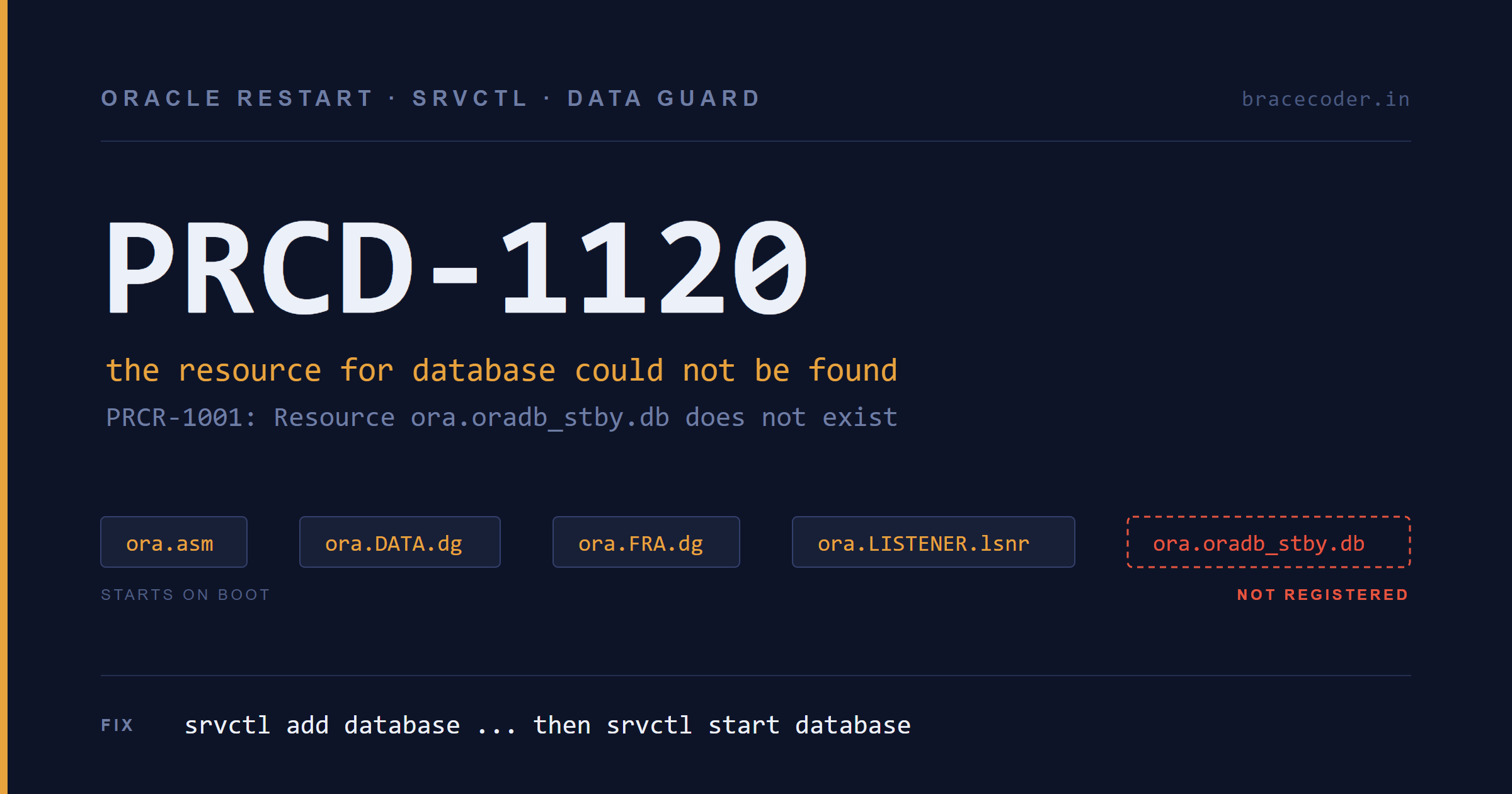
PRCD-1120 : The resource for database oradb could not be found.
PRCR-1001 : Resource ora.oradb.db does not exist
Two distinct problems are hiding in that one error.
The name is wrong. srvctl identifies a database by its DB_UNIQUE_NAME, which on the standby is oradb_stby, not oradb. And because these are two independent Oracle Restart installations with their own local repositories, nothing registered on dg1 is visible from dg2.
The registration doesn't exist. Correcting the name doesn't help — there is no resource to find. Confirm it in one command:
[oracle@dg2 ~]$ srvctl config databaseAn empty result means Oracle Restart is managing ASM, the diskgroups, and the listener, but knows nothing about the database sitting on top of them.
Why this matters more than it looks
The standby is running, so nothing is broken today. The problem is what happens at the next restart.
Grid Infrastructure starts what it has been told to start. On reboot it will bring up CSSD, ASM, the DATA and FRA diskgroups, and the listener — exactly the resources you can see — and then stop. No database resource means no standby instance, no MRP, and no redo apply.
Meanwhile the primary stays open and healthy. Redo accumulates, the archive destination eventually errors, and the transport lag climbs — but you only find out when someone thinks to look at the DR side. That's a data loss exposure created by a routine maintenance window, and it's the kind that hides well because every dashboard pointed at the primary stays green.
This happens most often after a standby is built with RMAN DUPLICATE ... FOR STANDBY. The duplicate creates and starts the instance; it never registers anything with Oracle Restart. If nobody runs srvctl add database afterward, the gap is created at build time and stays there until the first reboot finds it.
A quick way to confirm nothing owns the instance
[oracle@dg2 ~]$ ps -ef | grep [p]mon_oradb
oracle 8183 1 0 00:38 ? 00:00:00 ora_pmon_oradbNote the parent PID: 1. An instance started by the Oracle Restart oraagent is parented differently. PPID 1 means it was started manually and detached — a reliable tell that GI is not managing it.
Pre-flight: collecting every required detail
srvctl add database takes values that must match reality exactly. Guessing any of them produces a resource that registers cleanly and then fails to start. Here is the full list and where each value comes from.
| Flag | What it is | Where to get it |
|---|---|---|
-db | DB_UNIQUE_NAME | show parameter db_unique_name |
-dbname | DB_NAME | show parameter db_name |
-instance | The SID | echo $ORACLE_SID / v$instance |
-oraclehome | Database ORACLE_HOME | echo $ORACLE_HOME / /etc/oratab |
-spfile | spfile location | show parameter spfile / asmcmd find |
-pwfile | password file location | ls $ORACLE_HOME/dbs / asmcmd find |
-role | Current database role | v$database.database_role |
-startoption | State to start in | v$database.open_mode |
-policy | Autostart behaviour | your decision |
-diskgroup | ASM start dependencies | v$datafile etc. / asmcmd lsdg |
1. Identity: DB_NAME, DB_UNIQUE_NAME, SID
SQL> show parameter db_name
SQL> show parameter db_unique_name
SQL> select instance_name, status from v$instance;db_name string oradb
db_unique_name string oradb_stby
INSTANCE_NAME STATUS
---------------- ------------
oradb OPENRead that carefully, because it is the single most common source of failure here. DB_NAME and the SID are both oradb — identical to the primary. Only DB_UNIQUE_NAME differs. That is normal and correct for Data Guard, and it is exactly why srvctl status database -d oradb looked reasonable and still failed.
Cross-check the SID at the OS level:
[oracle@dg2 ~]$ echo $ORACLE_SID
oradb2. Role and open mode
These two determine -role and -startoption:
SQL> select database_role, open_mode from v$database;

DATABASE_ROLE    OPEN_MODE
---------------- --------------------
PHYSICAL STANDBY READ ONLY WITH APPLYREAD ONLY WITH APPLY means the standby is open in Active Data Guard mode. Register it with -startoption MOUNT and it will come back at MOUNT after the next restart — apply keeps running, the lag stays at zero, the broker still reports SUCCESS, and the read-only query capability quietly disappears. Anything pointing at that standby for reporting breaks, while every Data Guard health check says the configuration is fine.
Match the startoption to what you actually want:
MOUNT— standard physical standby, redo applied, not open"READ ONLY"— Active Data Guard (note the quotes; the space matters)
Licensing note: Active Data Guard is a separately licensed option on top of Enterprise Edition, and opening a physical standby read-only while MRP is applying is what triggers it. Fine in a lab. Worth being deliberate about before the same pattern is copied into production.
3. ORACLE_HOME
[oracle@dg2 ~]$ echo $ORACLE_HOME
[oracle@dg2 ~]$ cat /etc/oratabOr from inside the database:
SQL> select sys_context('userenv','oracle_home') from dual;4. spfile and password file
SQL> show parameter spfile

NAME     TYPE     VALUE
-------- -------- --------------------------------------------------
spfile string /u01/app/oracle/product/19.0.0/db_1/dbs/spfileoradb.oraIf this comes back blank, stop. The instance is running on a pfile, and the broker cannot persist property changes to a pfile. Create an spfile before going any further.
Then list the dbs directory:
[oracle@dg2 ~]$ ls -l $ORACLE_HOME/dbs/
-rw-r-----. 1 oracle asmadmin    12288 dr1oradb_stby.dat
-rw-r-----. 1 oracle asmadmin    12288 dr2oradb_stby.dat
-rw-r--r--. 1 oracle oinstall     1266 initoradb.ora
-rw-r-----. 1 oracle asmadmin       24 lkORADB_STBY
-rw-r-----. 1 oracle oinstall     2048 orapworadb
-rw-r-----. 1 oracle asmadmin 4608 spfileoradb.oraWhat you're looking for:
spfileoradb.ora— the spfile, named after the SID, not the unique nameorapworadb— the password file, same convention (orapw$ORACLE_SID)dr1oradb_stby.dat/dr2oradb_stby.dat— broker config files, named after the unique namelkORADB_STBY— the instance lock file, confirming the unique name in use
Note the mixed naming: SID-based for spfile and password file, unique-name-based for the broker files. That inconsistency trips people up when they go looking for a file that "should" be there.
If both files are at these default paths, -spfile and -pwfile are technically optional — Oracle Restart derives them from the SID. Pass them explicitly anyway. It costs nothing and removes any dependency on derivation rules.
5. Finding config files when they live in ASM
Plenty of builds put the spfile and password file in ASM instead. Check before assuming:
[grid@dg2 ~]$ asmcmd find --type PARAMETERFILE + "*"
[grid@dg2 ~]$ asmcmd find --type PASSWORD + "*"Or look directly under the database's directory:
[grid@dg2 ~]$ asmcmd ls +DATA/ORADB_STBY/
DATAFILE/
ONLINELOG/
TEMPFILE/
control01.ctlIn this case there is no PARAMETERFILE/ or PASSWORD/ subdirectory, which confirms both files are on the local filesystem. Trying to list a directory that doesn't exist gives you a clear answer:
ASMCMD-8002: entry 'PARAMETERFILE' does not exist in directory '+DATA/ORADB_STBY/'Note the path is the DB_UNIQUE_NAME in uppercase (ORADB_STBY), not the DB_NAME. ASMCMD paths are case-sensitive.
6. Working out the diskgroup list
-diskgroup builds the start-order dependency, so the database never attempts to open before ASM has mounted the diskgroups it needs. Get the list from where the files actually are, not from memory.
From the database:
SQL> select distinct upper(regexp_substr(fname, '^\+[A-Za-z0-9_]+')) as diskgroup
     from (
       select name   as fname from v$datafile
       union all select name       from v$tempfile
       union all select member     from v$logfile
       union all select name       from v$controlfile
     )
where fname like '+%';Then check the two parameters that point at diskgroups without appearing in those views:
SQL> show parameter db_create_file_dest
SQL> show parameter db_recovery_file_dest
SQL> show parameter log_archive_dest_1Control files are worth inspecting on their own, because a standby is the copy that has to survive:
SQL> show parameter control_files

NAME            TYPE     VALUE
--------------- -------- ------------------------------------------
control_files   string   +DATA/ORADB_STBY/control01.ctl,
+FRA/ORADB_STBY/control02.ctlMultiplexed across two diskgroups — good. A single control file on a standby is a real risk worth fixing during your next window.
From the ASM side, confirm those diskgroups are mounted and have room:
[grid@dg2 ~]$ asmcmd lsdgCheck State is MOUNTED, and note Free_MB on FRA in particular — a standby that fills its recovery area stops applying.
Two more asmcmd commands worth knowing here:
[grid@dg2 ~]$ asmcmd lsct           # which databases are connected to ASM
[grid@dg2 ~]$ asmcmd du +DATA/ORADB_STBY # space consumed by this databaselsct is the useful one — it lists ASM's connected clients, so it shows the standby instance using the diskgroups even while Oracle Restart claims no such database exists. Seeing the instance in lsct and not in srvctl config database is the contradiction this whole post is about.
7. Standby redo logs
Not needed for registration, but check it while you're here, because it's the thing that ruins a switchover:
SQL> select group#, thread#, bytes/1024/1024 mb, status from v$standby_log;You want one more standby redo log group per thread than you have online log groups, all at the same size as the online logs. In ASM these live in the ONLINELOG/ directory alongside the online logs, so an asmcmd ls cannot distinguish them — the view is the only reliable check.
Registering the database
With every value confirmed:
[oracle@dg2 ~]$ srvctl add database -db oradb_stby \
  -oraclehome /u01/app/oracle/product/19.0.0/db_1 \
  -dbname oradb \
  -instance oradb \
  -spfile /u01/app/oracle/product/19.0.0/db_1/dbs/spfileoradb.ora \
  -pwfile /u01/app/oracle/product/19.0.0/db_1/dbs/orapworadb \
  -role PHYSICAL_STANDBY \
  -startoption "READ ONLY" \
  -policy AUTOMATIC \
-diskgroup DATA,FRAThe flags that matter most:
-db vs -dbname vs -instance. -db is DB_UNIQUE_NAME, -dbname is DB_NAME, -instance is the SID. On this standby that's oradb_stby, oradb, oradb respectively. Reversing the first two is the classic mistake.
-instance is not optional here. The SID (oradb) differs from the unique name (oradb_stby). Omit the flag and srvctl may derive the SID from -db, then try to start an instance called oradb_stby that has no spfile, no password file, and no lock file. It registers without complaint and fails on the first start.
-role PHYSICAL_STANDBY. Omit it and the resource registers as PRIMARY, which misleads every subsequent role check and switchover readiness test.
-policy AUTOMATIC. This is what makes the resource start on boot. MANUAL registers it but never starts it automatically; NORESTART won't even restart it after a failure.
-diskgroup DATA,FRA. Creates the ordering dependency on ASM.
Verify what got registered:
[oracle@dg2 ~]$ srvctl config database -db oradb_stby
Database unique name: oradb_stby
Database name: oradb
Oracle home: /u01/app/oracle/product/19.0.0/db_1
Spfile: /u01/app/oracle/product/19.0.0/db_1/dbs/spfileoradb.ora
Password file: /u01/app/oracle/product/19.0.0/db_1/dbs/orapworadb
Start options: read only
Stop options: immediate
Database role: PHYSICAL_STANDBY
Management policy: AUTOMATIC
Disk Groups: DATA,FRA
Database instance: oradbCheck the last line especially: Database instance: oradb, not oradb_stby.
If you need to correct anything, srvctl modify database takes the same flags:
[oracle@dg2 ~]$ srvctl modify database -db oradb_stby -startoption "READ ONLY"
[oracle@dg2 ~]$ srvctl config database -db oradb_stby | grep -i "start options"
Start options: read onlyRegistration alone is not the fix
Immediately after add, the resource looks like this:
[grid@dg2 ~]$ crsctl stat res ora.oradb_stby.db -t
Name           Target  State        Server                   State details
--------------------------------------------------------------------------------
ora.oradb_stby.db
      1        OFFLINE OFFLINE                               STABLE
[oracle@dg2 ~]$ srvctl status database -db oradb_stby
Database is not running.The instance is running — ps proves it — but the first column, TARGET, is OFFLINE. Grid Infrastructure knows the database exists and has no instruction to start it. Reboot at this point and you are in exactly the DR gap you set out to fix, now with a resource entry to show for it.
Only srvctl start database flips TARGET to ONLINE and persists that. So the bounce is not optional:
[oracle@dg2 ~]$ sqlplus -s / as sysdba <<EOF
shutdown immediate
EOF
Database closed.
Database dismounted.
ORACLE instance shut down.

[oracle@dg2 ~]$ srvctl start database -db oradb_stbyShut down through SQL*Plus first, because GI doesn't yet believe it owns a running instance. On a busy standby, plan this like any other restart — apply stops for the duration.
The test that actually proves it
Checking srvctl status after the start you just ran proves very little. Stop and start High Availability Services instead — it exercises the same path a reboot does:
[grid@dg2 ~]$ crsctl stop has
CRS-2673: Attempting to stop 'ora.oradb_stby.db' on 'dg2'
CRS-2677: Stop of 'ora.oradb_stby.db' on 'dg2' succeeded
CRS-2673: Attempting to stop 'ora.DATA.dg' on 'dg2'
CRS-2677: Stop of 'ora.DATA.dg' on 'dg2' succeeded
...
CRS-4133: Oracle High Availability Services has been stopped.

[grid@dg2 ~]$ crsctl start has
CRS-4123: Oracle High Availability Services has been started.
Notice the shutdown order in that output — the database stops before the diskgroups, and ASM stops last. That ordering is the -diskgroup dependency doing its job. It's also the visible proof the dependency was registered correctly.
Then, without typing anything else:
[grid@dg2 ~]$ crsctl stat res -t

ora.oradb_stby.db
      1        ONLINE  ONLINE       dg2                      Open,Readonly,HOME=/
                                                             u01/app/oracle/produ
                                                             ct/19.0.0/db_1,STABL
                                                             E
ONLINE ONLINE with Open,Readonly in the state details. Target and state both online, opened in the mode you configured, with no manual intervention. That is the fix.
Ignore ora.ons and ora.diskmon showing OFFLINE. Both are normal for standalone Oracle Restart — diskmon is Exadata-only, and ONS stays down unless you've configured it.
Post-restart checks
Oracle Restart starts the instance. It does not start MRP — the broker does. Verify both layers separately:
SQL> select database_role, open_mode from v$database;
SQL> select process, status, sequence# from v$managed_standby where process like 'MRP%';DGMGRL> SHOW CONFIGURATION LAG;
oradb - Primary database
oradb_stby - Physical standby database
Transport Lag: 0 seconds (computed 2 seconds ago)
Apply Lag: 0 seconds (computed 2 seconds ago)
Configuration Status:
SUCCESSIf MRP never appears, check SHOW DATABASE 'oradb_stby' for an intended state of APPLY-OFF — a shutdown can leave it there — and correct it with EDIT DATABASE 'oradb_stby' SET STATE='APPLY-ON'.
Transport lag and apply lag are independent measurements. Zero on both means redo is arriving and being applied; a healthy transport lag with a climbing apply lag is a different problem entirely.
Two things to carry forward
Check the primary too. Run srvctl config database -db oradb on dg1 and confirm the role attribute reads PRIMARY. The broker maintains this during switchover — but only for databases that are actually registered, which is one more reason not to leave either side out.
Re-check startoption after your first switchover. The role attribute is updated by the broker; -startoption is static and is not. A READ ONLY startoption on a database that has since become the primary is not what you want, and nothing will warn you about it until a restart.
Summary
# 1. Confirm the gap
srvctl config database                       # empty?
ps -ef | grep [p]mon_<sid>                   # PPID 1?

# 2. Collect the details
show parameter db_name / db_unique_name / spfile / control_files
select database_role, open_mode from v$database;
ls -l $ORACLE_HOME/dbs/
asmcmd lsdg ; asmcmd ls +DATA/<DB_UNIQUE_NAME>/ ; asmcmd lsct

# 3. Register
srvctl add database -db ... -dbname ... -instance ... -role ... -startoption ... -diskgroup ...

# 4. Set TARGET online
srvctl start database -db <db_unique_name>

# 5. Prove it
crsctl stop has ; crsctl start has ; crsctl stat res -tA standby that runs is not a standby that recovers. The gap between "it's applying redo right now" and "it will still be applying redo after a reboot" is one srvctl command wide — and it is invisible from the primary, which is precisely why it survives so long in real environments.
Frequently asked questions
The standby is running and applying redo. Why does srvctl say PRCD-1120?
srvctl config database returning nothing confirms it.How can I tell whether an instance was started manually?
ps -ef | grep [p]mon_<sid>. A parent PID of 1 means it was started by hand and detached, so Grid Infrastructure is not managing it.What is the difference between -db, -dbname and -instance?
-db is the DB_UNIQUE_NAME, -dbname is the DB_NAME and -instance is the SID. On this standby they are oradb_stby, oradb and oradb. Swapping the first two, or leaving out -instance, gives a resource that registers but fails to start.Should I use -startoption MOUNT or "READ ONLY"?
How do I prove the standby will come back after a reboot?
crsctl stop has and then crsctl start has on the standby host. Then check srvctl status database -db oradb_stby and confirm in DGMGRL that apply lag returns to zero.Why did this happen in the first place?
srvctl add database as the last step of every standby build.

Comments
0Please sign in to leave a comment.
No comments yet
Be the first to share your thoughts!