Automating Standalone Database Startup and Shutdown
Automating Database Startup and Shutdown
14 articles with this tag
Automating Database Startup and Shutdown
This material describes how to install Oracle database 19c on a RAC Environment. Make sure you are logged on as grid to rac1 and start asmca utility
Oracle Real Application Clusters (RAC) is a high-availability solution that allows multiple instances of Oracle Database to run on different servers, accessing a single database. This setup ensures that if one server fails, the database remains accessible through other servers, thus providing both high availability and scalability. Oracle RAC provides a robust solution for enterprises needing high availability and scalability. Proper setup and configuration are crucial for maximizing the benefits of a RAC environment.
This material describes how to install Oracle Linux 7.9 on a VM machine that can then be used as a seed to install Oracle software products, like Oracle Database, Clusterware, Enterprise Manager, Weblogic.. etc
In Oracle Real Application Clusters (RAC) environments, especially when using Automatic Storage Management (ASM), the Cluster Ready Services (CRS) and SCAN listeners play a crucial role in managing connectivity and service registration.
CRSCTL Commands: - Cluster Related Commands crs_stat t Shows HA resource status (hard to read) crsstat Output of crs_stat t formatted nicely
This material describes how to install Oracle database 12cR1 on a RAC Environment. Make sure you are logged on as grid to rac1 and start asmca utility
Oracle Real Application Clusters (RAC) is a high-availability solution that allows multiple instances of Oracle Database to run on different servers, accessing a single database. This setup ensures that if one server fails, the database remains accessible through other servers, thus providing both high availability and scalability. Oracle RAC provides a robust solution for enterprises needing high availability and scalability. Proper setup and configuration are crucial for maximizing the benefits of a RAC environment.
In the realm of database management, performance testing plays a crucial role in ensuring optimal functionality and efficiency. Oracle Database, renowned for its robustness and scalability, requires thorough performance evaluation to maintain peak operational conditions. One valuable tool in this regard is Swingbench, a versatile and widely used benchmarking tool specifically designed for Oracle Database.
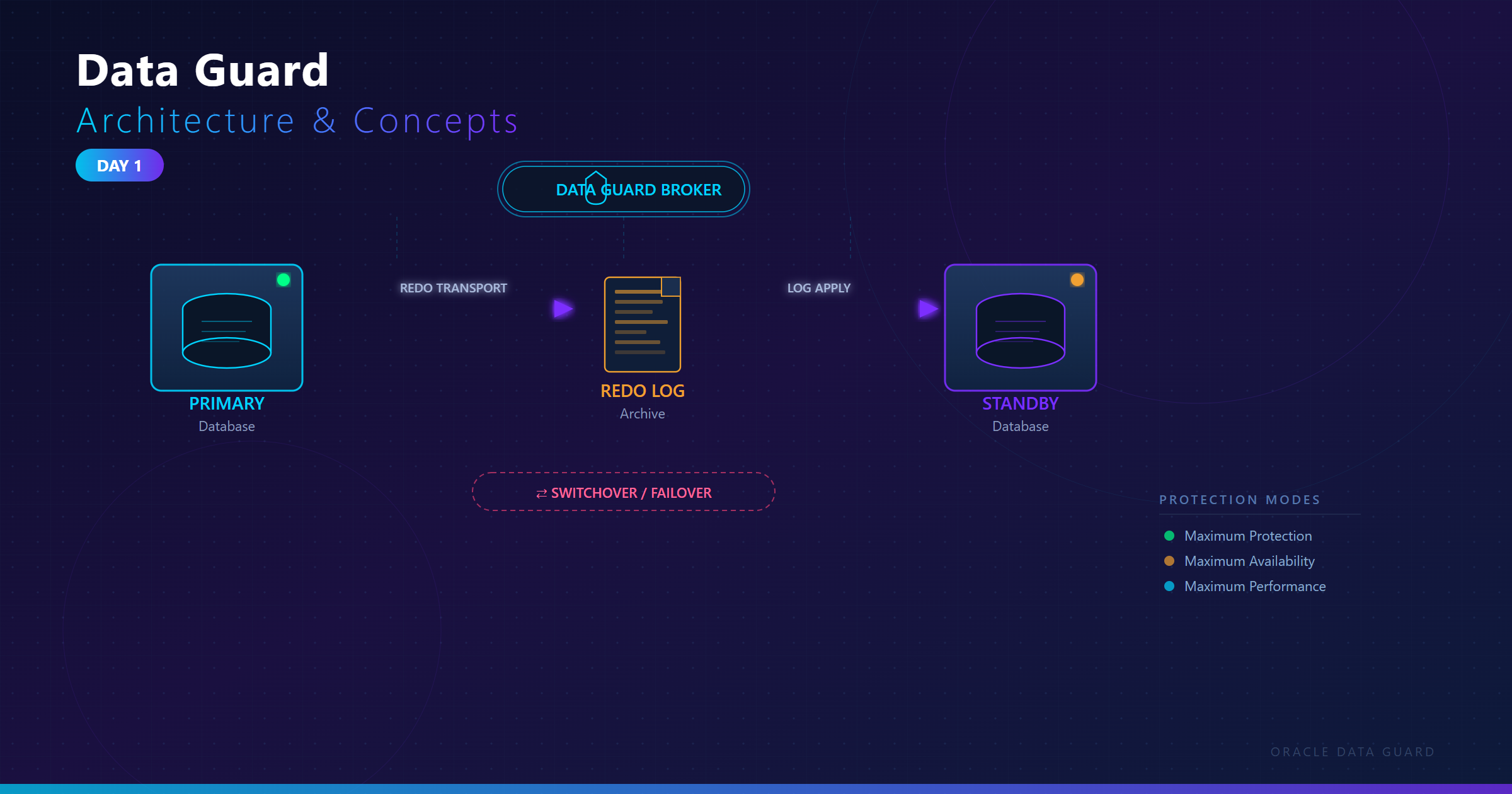
Oracle Data Guard is a comprehensive disaster recovery and high availability solution built into Oracle Database. It maintains one or more synchronized copies (standby databases) of a production database (primary database) to protect against data loss, corruption, and disasters while minimizing downtime.
Oracle Data Pump is a powerful utility for exporting and importing database objects and data. It was introduced in Oracle Database 10g as an enhancement to the older export/import utilities (exp and imp). Data Pump provides a more flexible, scalable, and high-performance mechanism for moving data between Oracle databases compared to its predecessor.